Native CAD interfaces
Direct support for the CAD formats listed here.
Modern, easy-to-use CAD viewer
Cost-effective CAD converter for many formats
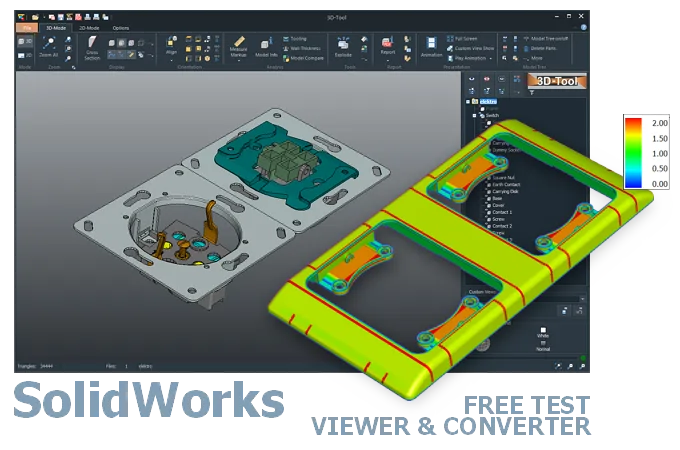
The 3D-Tool Viewer opens SolidWorks SLDPRT and SLDASM files without SolidWorks software.
The 3D-NativeCAD Converter converts SolidWorks models to a wide range of formats such as STEP, IGES, JT, SAT, Parasolid X_T, STL, OBJ, 3D-PDF, 3D-HTML, FBX, 3MF, and glTF.
Direct support for the CAD formats listed here.
Fully functional, no obligation.
Stable, precise CAD data processing.
Compatible with current Windows versions.
SolidWorks files regularly move between companies that don't run SolidWorks themselves - for example when a job shop, customer, or service provider receives an SLDPRT or SLDASM model for review. The 3D-Tool Viewer opens these files directly, with full assembly structure, and provides tools for measurements, wall thickness, and draft analysis.
Beyond simple viewing, the 3D-NativeCAD Converter turns SLDPRT and SLDASM models into STEP and other common exchange formats - for example to continue working in your own CAD system or to prepare a part for manufacturing.
New SolidWorks releases with numerous new features appear every year. Releases use the year as their version designation.
Older releases cannot open file versions created with newer releases. Starting with SolidWorks 2024, you can save models back by up to two versions. To do so, the design must not contain features that are not available in the older version. Otherwise, you must suppress those features before saving.
In 1995, SolidWorks was the most affordable and easiest-to-use 3D CAD system, both in terms of operation and hardware requirements.
Typically, a SolidWorks installation is used for this. Alternatively, the files can also be opened with CAD/CAM software that has a SolidWorks interface.
The free eDrawings supports native SolidWorks parts, assemblies and drawings and offers simple markup and measurement functions.
The 3D-Tool CAD viewer also opens SLDPRT and SLDASM files, but provides extensive measurement and analysis tools. 3D-Tool can be tested free of charge for 14 days.
Convert SLDPRT and SLDASM files to STEP with a 3D converter. The 3D-NativeCAD Converter in 3D-Tool Premium reliably converts native SolidWorks models and models from many other CAD systems into common 3D exchange formats. Available target formats are STEP, IGES, JT, SAT, and Parasolid X_T. For exchange with Designcenter (Siemens NX) and Designcenter Solid Edge, the Parasolid X_T or X_B format is specifically recommended when exporting from SolidWorks. The file format comparison lists the supported SolidWorks releases and shows which edition provides the SolidWorks interface and converter.
Without a converter or CAD software with a SolidWorks interface, the remaining option is to export from SolidWorks to a common 3D exchange format, such as STEP.
3D-Tool is a CAD Viewer with many native CAD interfaces, including SolidWorks, as well as professional measurement tools, draft analysis, and wall thickness analysis.
Free, no-obligation 14-day trial with all features, the SolidWorks interfaces, and the 3D-NativeCAD Converter. The trial key activates all 3D interfaces, including Designcenter (Siemens NX), CATIA, Inventor, STEP, SAT, and Parasolid.