Native CAD interfaces
Direct support for the CAD formats listed here.
Modern, easy-to-use CAD viewer
Cost-effective CAD converter for all formats
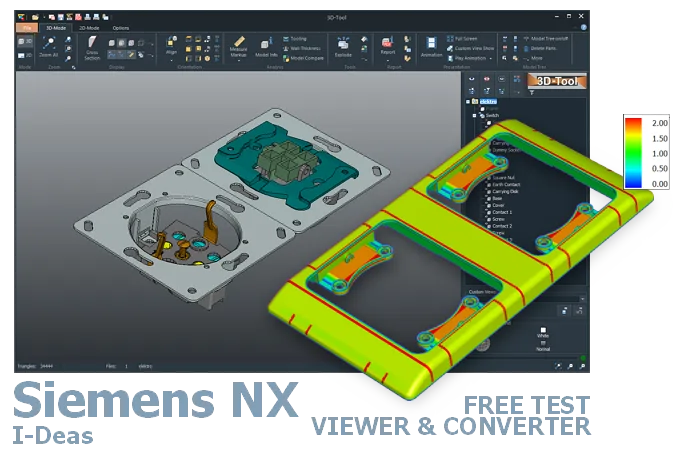
The 3D-Tool Viewer opens files from Designcenter (Siemens NX) and I-DEAS without Siemens software.
The 3D-NativeCAD Converter converts Designcenter (Siemens NX) and I-DEAS models to a wide range of formats such as STEP, IGES, JT, SAT, Parasolid X_T, STL, OBJ, 3D-PDF, 3D-HTML, FBX, 3MF, and glTF.
Direct support for the CAD formats listed here.
Fully functional, no obligation.
Stable, precise CAD data processing.
Compatible with current Windows versions.
A PRT file from Designcenter (Siemens NX) often won't open for the recipient at all without a matching license - Windows tries the wrong application, or no suitable viewer is installed at all. The 3D-Tool Viewer opens Designcenter (Siemens NX) and I-DEAS models regardless of the original software, including assemblies, dimensions, and PMI data.
In automotive and aerospace supply chains, such models frequently arrive from a customer even though no matching CAD license exists at the receiving desk. For further processing, the 3D-NativeCAD Converter turns the models into STEP and other common exchange formats.
New Designcenter (Siemens NX) releases appear regularly. The version designations at a glance:
Since 2013, or Siemens NX 9, Siemens PLM Software has offered the software only as a 64-bit version. Support for MacOS ended with Siemens NX 12.
I-DEAS and its file formats MF1, ARC, UNV, and PKG are still used. They mainly serve to maintain existing long-term projects and historical data, especially in the automotive, aerospace, and defense industries.
In contrast to most other CAD systems, Designcenter (Siemens NX) has no individual file extensions for parts, assemblies and drawings.
Designcenter (Siemens NX) uses the Parasolid modeling kernel. Parasolid X_T and X_B files are 3D exchange formats without a modification history. However, they are the preferred choice for exchanging 3D models between CAD/CAM programs with a Parasolid kernel, including Designcenter (Siemens NX), SolidWorks, and Designcenter Solid Edge.
Designcenter (Siemens NX) provides only limited support for the native I-DEAS formats MF1, ARC, UNV, and PKG.
Open native PRT data from Designcenter (Siemens NX) with a Designcenter (Siemens NX) installation. Alternatively, open PRT files with CAD/CAM software that has a Designcenter (Siemens NX) interface, such as SolidWorks or Designcenter Solid Edge.
Without an I-DEAS installation, the native I-DEAS formats MF1, ARC, UNV, and PKG generally require special import and conversion interfaces.
There are no free viewers for Designcenter (Siemens NX) and I-DEAS. However, compared to a CAD system, CAD viewers are an affordable alternative. The 3D-Tool CAD Viewer opens 3D models from Designcenter (Siemens NX) PRT files and supported I-DEAS formats. You can try it free for 14 days.
Convert files from Designcenter (Siemens NX) and I-DEAS to common 3D exchange formats with a 3D converter. The 3D-NativeCAD Converter in 3D-Tool Premium reliably converts native models from Designcenter (Siemens NX), I-DEAS models, and models from many other CAD systems. Target formats include the common 3D exchange formats STEP, IGES, JT, SAT, and Parasolid X_T.
Without a converter or CAD software with a suitable interface, the design must be exported to a common 3D exchange format, such as STEP.
3D-Tool is a CAD Viewer with many native CAD interfaces, including Designcenter (Siemens NX) and I-DEAS. 3D-Tool provides professional measurement, draft analysis, and wall thickness analysis.
Free, no-obligation 14-day trial with all features, the Designcenter (Siemens NX) interfaces, and the 3D-NativeCAD Converter. The trial key activates all 3D interfaces, including CATIA, Designcenter (Siemens NX), SolidWorks, Inventor, STEP, SAT, and Parasolid.