Native CAD interfaces
Direct support for the CAD formats listed here.
Modern, easy-to-use CAD viewer
Cost-effective CAD converter for all formats
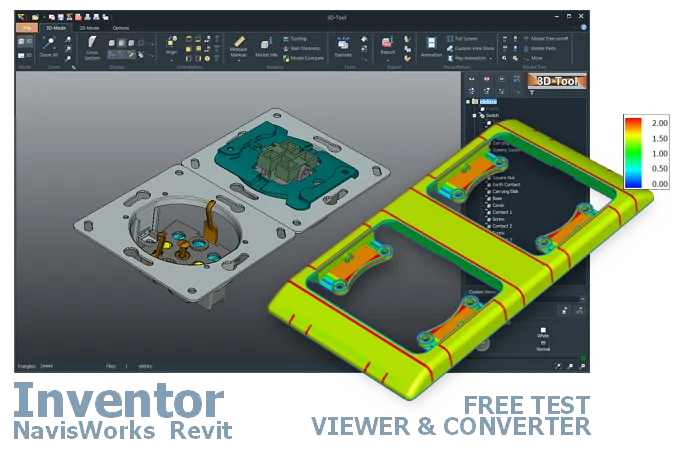
The 3D-Tool Viewer opens Autodesk Inventor, Navisworks, and Revit files without Autodesk software.
The 3D-NativeCAD Converter converts Autodesk models to a wide range of formats such as STEP, IGES, JT, SAT, Parasolid X_T, STL, OBJ, 3D-PDF, 3D-HTML, FBX, 3MF, and glTF.
Direct support for the CAD formats listed here.
Fully functional, no obligation.
Stable, precise CAD data processing.
Compatible with current Windows versions.
Whether it's an IPT or IAM part from Inventor, an NWD coordination model from Autodesk Navisworks, or an RVT project from Autodesk Revit - these files often reach people who don't run that particular Autodesk product themselves, such as a supplier, a site manager, or a colleague in another department. The 3D-Tool Viewer opens all three formats directly.
Unlike plain online viewers, the 3D-NativeCAD Converter also turns Inventor, Navisworks, and Revit models into STEP and other common exchange formats - for example to continue working in a mechanical CAD system outside the Autodesk ecosystem.
Files with the IAM and IPT file extensions are native 3D files from Autodesk Inventor CAD/CAM software. IPT is the part file format and contains 3D geometry and, in some cases, Product Manufacturing Information (PMI). IAM is the assembly file format and is linked to at least one, but usually several, IPT files and often additional IAM files.
Files with the NWD file extension are published projects from Autodesk Navisworks CAD software. They contain all 3D models and project-related data from a Navisworks project in a single compressed file.
RVT and RFA files are Autodesk Revit formats for BIM projects (Building Information Modeling). RVT files (Revit project files) contain the entire 3D model of a project, while RFA files (Revit families) contain individual, reusable components such as doors, windows, or furniture.
Inventor 1 was released in 1999, and through Inventor 11 the versions were simply numbered. Since 2007, versions have been named using the year after the release year; for example, the version released in 2024 is called Inventor 2025. File versions created with newer releases cannot be opened with older releases.
All Navisworks versions, such as Navisworks 2025, use the NWD format. When creating an NWD file, you can choose to save it in an older version. Through Navisworks 2015, this was necessary if a user of an older version needed to open the file. Since 2016, NWD files have been backward compatible. You can therefore open a Navisworks 2025 NWD file with Navisworks 2016.
Revit version names are based on the release year, for example Revit 2025. Revit RVT and RFA files are neither backward nor forward compatible. Older files must be updated before they can be opened in a new version, which makes them inaccessible in the older version.
IPT and IAM files are typically opened with an Inventor installation. Alternatively, CAD/CAM software with an Inventor interface, such as Designcenter (Siemens NX), can open these files. Inventor is free to use in read-only mode.
Besides a commercial Navisworks installation, the free Navisworks Freedom viewer opens NWD files. Like Inventor, Revit can be used free of charge in Viewer Mode to view RVT and RFA files.
Autodesk now also offers a web viewer for Inventor, Navisworks, and Revit models. Using the viewer requires registration with Autodesk.
The 3D-Tool CAD Viewer opens IPT, IAM, NWD, RVT, and RFA files and combines easy operation with many measurement and analysis tools. 3D-Tool can be tested free of charge for 14 days.
Convert IPT, IAM, NWD, RVT, and RFA files to STEP with a 3D converter.
The 3D-NativeCAD Converter in 3D-Tool Premium reliably converts these formats and models from many other CAD systems into common 3D exchange formats. Available target formats are STEP, IGES, JT, SAT, and Parasolid X_T. Whether conversion is possible depends on the geometry contained in the file. Pure mesh data is not reconstructed as exact CAD surfaces.
Without a converter or CAD software with the appropriate interfaces, the creator must export the design to a common 3D exchange format, such as STEP.
3D-Tool is a CAD Viewer with many native CAD interfaces, including Inventor, Navisworks, and Revit. It provides professional measurement tools, draft analysis, and wall thickness analysis.
Free, no-obligation 14-day trial with all features, the Autodesk interfaces, and the 3D-NativeCAD Converter. The trial key activates all 3D interfaces, including CATIA, Designcenter (Siemens NX), SolidWorks, Creo, STEP, and SAT.