intuitive & practical3D without CAD knowledge

affordable & universalmany 3D/2D - Interfaces

Siemens NX Viewer
open and convert NX and I-Deas files

Siemens NX viewer for PRT part and assemblies

Additional Native Siemens NX File Formats

In contrast to most other CAD systems, NX has no individual file extensions for parts, assemblies and drawings.

Worth mentioning is the Parasolid modeling kernel used by Siemens NX. Parasolid X_T and X_B files are 3D exchange formats without a modification history, but are the first choice for exchanging 3D models between CAD/CAM programs with a Parasolid core such as Siemens NX, SolidWorks and Solid Edge.

The native I-Deas formats MF1, ARC, UNV, and PKG are only partially supported by Siemens NX and require special import and conversion interfaces.


How do I convert Siemens NX and I-Deas files?

If you don't have CAD software with a Siemens NX or I-Deas interface, the design must be exported to a common 3D exchange format, such as STEP.

Converting Siemens NX and I-Deas to STEP is also possible with a 3D converter or CAD converter. 3D-Tool Premium includes the 3D NativeCAD Converter. In addition to native Siemens NX models, this converts I-Deas models and models from many common CAD systems into the 3D exchange formats STEP, IGES, SAT, and Parasolid X_T, which are supported by most CAD/CAM programs.

Test the Siemens NX Viewer and Siemens NX Converter

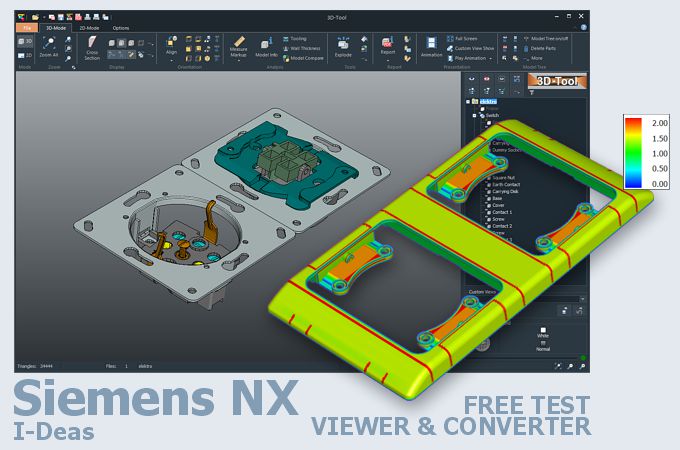
3D-Tool is a CAD viewer with many native CAD interfaces, including Siemens NX and I-Deas. 3D-Tool offers professional measurement, draft analysis, and wall thickness analysis.

  • Open, dimension, annotate, and publish Siemens NX and I-Deas files for the 3D-Tool Free Viewer or as 3D PDF
  • Open Siemens NX and I-Deas files and save them as STL, 3DS, PLY, WRL, OBJ, or PLY
  • Convert Siemens NX and I-Deas files to STEP, IGES, SAT, X_T, and JT
  • Convert NX and I-Deas models into 3D product visualizations such as 3D HTML, FBX, Collada, 3MF, and glTF.

Free and non-binding 14-day trial with all features, the Siemens NX interfaces, and the 3D Native CAD Converter. The demo key activates all 3D interfaces, such as CATIA, Siemens NX, SolidWorks, Inventor, STEP, SAT, and Parasolid.

More information on the 3D-Tool CAD-Viewer and Converter
3D-Tool
Viewer

Go to the 3D-Tool Download
Download
and Trial

Show the 3D-Tool price list
Licenses
and Prices